iVMControl
:) It does not replace your vSphere® Client, but it comes really close to it.
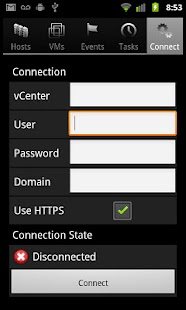
iVMControl allows you to connect remotely and securely to your Virtualization Hypervisors and monitor the activity on the hosts and on the VMs.
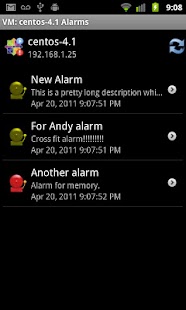
You will be able to check alarms, events and task status, see the status of every host and VM, the operating system installed, the power state, the status and version of your vmtools, check if any VM has raised an alarm and so on.
You can also remotely power on, power off or suspend virtual machines, enter or exit maintenance mode, reboot, disconnect or reconnect your ESX hosts.
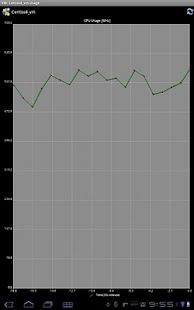
You can see the graphs for the CPU usage, memory, NIC card usage, HDD usage for both VMs and Hosts, you can make/restore/manage snapshots of VMs.
In addition, we offer VMotion support and screenshots for VMs (more to come...)
A WiFi connection is recommended, but not required.
You can also use VPN connections if you have a VPN client on your device.
For slower connections, you might want to tweak your connection timeout parameter (by default 30 sec).
Visit iVMControl's Facebook page here:http://www.facebook.com/pages/IVMControl/175381199162251
** NOTE ** Please note that for ESXi *FREE*, Vmware decided to offer read-only access to the management APIs.
This applies to all management applications, and is enforced by Vmware.
What this means for iVMControl is that if you have a FREE ESXi, you will be able to use only the 'read-only' (monitoring) functions of iVMControl.
If you have a paid license of ESXi (Essentials license is enough) this does not apply to you.
Console support for ESX/vCenter.
Requirements: Please note that regardless of the connection point (ESX(i)/vCenter), the console connects *directly* to the ESX host where the VM you want to monitor resides.
This implies you need to make sure that your ESX hosts have IP addresses that are *routable*, otherwise you will not be able to access the VNC console; you need to make sure that the port configured (in the range 5900-5999) is allowed through your firewall for each ESX device you want to connect to.
Furthermore, please make note of the fact that only the 8-character password is encrypted with the standard VNC client.
All VNC client traffic is sent unencrypted across the network.
If security is a concern in your organization, you need to be aware of this.
You can disable your VNC terminal once you are done with the Console session (use Configure Console and disable VNC altogether).
VMWare Tools needs to be installed on each and every VM that is monitored through iVMControl's console connection.
Check the Vmware knowledge base on other requirements:
http://kb.vmware.com/selfservice/microsites/search.do?language=en_US&cmd=d-isplayKC&externalId=1246
Please contact us with questions, that's what the contact button is for :)
About iVMControl
- Package name (App ID)
- com.projecteureka.android.aVMControl
- Available on
- Google Play
- Price
- Free
- Version
- v3.1.3
Looking for the iVMControl APK?
The safest way to get iVMControl (com.projecteureka.android.aVMControl) on your Android device is to install it directly from Google Play — you'll always get the latest official version, automatic updates, and no risk of modified or infected APK files from third-party sites.
Social Features
Connect and share with friends and the community.
Gaming Features
Enjoy immersive gaming experience with various game modes.
Productivity Tools
Boost your productivity with powerful tools and features.
See iVMControl in Action
Frequently Asked Questions
Is iVMControl free?
Yes, iVMControl is free to download and install on Android through Google Play.
How do I install iVMControl on Android?
Open Google Play on your Android phone or tablet, search for iVMControl or tap the Google Play button on this page, then tap Install. The app downloads and installs automatically.
What is com.projecteureka.android.aVMControl?
com.projecteureka.android.aVMControl is the App ID (package name) of iVMControl on Google Play. Every Android app has a unique package name, and it is the safest way to verify you are installing the official app.
Is iVMControl safe to download?
Installing iVMControl from Google Play is the safest option: you get the official version, verified by Google Play Protect, with automatic updates. Avoid APK files from unofficial third-party sites.
Get iVMControl Today
iVMControl for Android — free download on Google Play.
Compatible with Android phones and tablets — available on Google Play.
Ask AI about this app
Get instant answers about features, tips and more from popular AI assistants.